Picture Mushroom - Mushroom ID
- 4.1
- Rating
- 1.00M
- Installs
- Free
- Price

 Analysis by App-foxy
I found Picture Mushroom - Mushroom ID most useful as a first step when I come across an unfamiliar fungus and want a quick, understandable starting point. It is an education app from Next Vision Limited, built around identifying mushrooms from photographs and learning more through a field-guide style experience. The free download makes it easy to try, although optional in-app purchases range from $0.99 to $32.99 per item.
My main interest was not simply whether it could name a mushroom. I wanted to see how comfortably it worked for different people and in different situations: someone reading outdoors in bright light, a user taking a shaky close-up photo, a beginner who does not know which details matter, or a person who needs simple navigation rather than dense botanical language. On that basis, it feels approachable, but it also needs to be used with sensible limits.
How clearly the app works for different users
I find the app’s clearest strength is how it gives different people a shared starting point: a photograph can help a beginner, a child with an adult, or a more experienced observer begin discussing what they see. That makes it useful beyond solo identification, especially when readers have different levels of confidence with botanical terms. I’d still match the way I use it to the person and the stakes, because a learning prompt and a safety decision are not the same thing.
You May Also Like

 Blood Strike: 2.5 Anniversary
Blood Strike’s Loadouts Turn Every Drop Into a Tactical Gamble
A close look at Blood Strike’s custom loadouts: how fast access to signature weapons reshapes its battle royale rhythm, rewards preparation, and narrows the gap between fights.

 Pandora - Music & Podcasts
Pandora’s Music Is Easy to Start, but Harder to Recover
Pandora’s strength is its low-effort path from a seed to a station. Its weak spot is how much confidence it asks you to place in connection, setup, and quiet recovery.

 8 Ball Pool
 Is Built on Rivalries, Rematches, and Routine
A close look at the rivalries, rematches, shared routines, and unanswered safety questions that turn a quick pool match into a persistent mobile community.

 Samsung Music
’s Quiet Strength Is Playing What You Already Own
Its reach comes less from spectacle than from dependable access to a personal library. That simplicity is both the app’s strongest retention engine and its ceiling.

 AccuWeather: Weather Radar
AccuWeather Review: A Quick, Clear Forecast for Everyday Decisions
For everyday plans, the best forecast is the one you can understand quickly. AccuWeather makes rain timing, radar, and local conditions easy to act on, with a few trade-offs.

 Hill Climb Racing
Why Hill Climb Racing Still Turns Crashes Into One More Run
A tiny car, a bumpy hill and one more upgrade: Hill Climb Racing keeps resurfacing because its simple chaos makes every near-miss feel personal.
More From Our News Desk



Readable information and a low-friction starting point
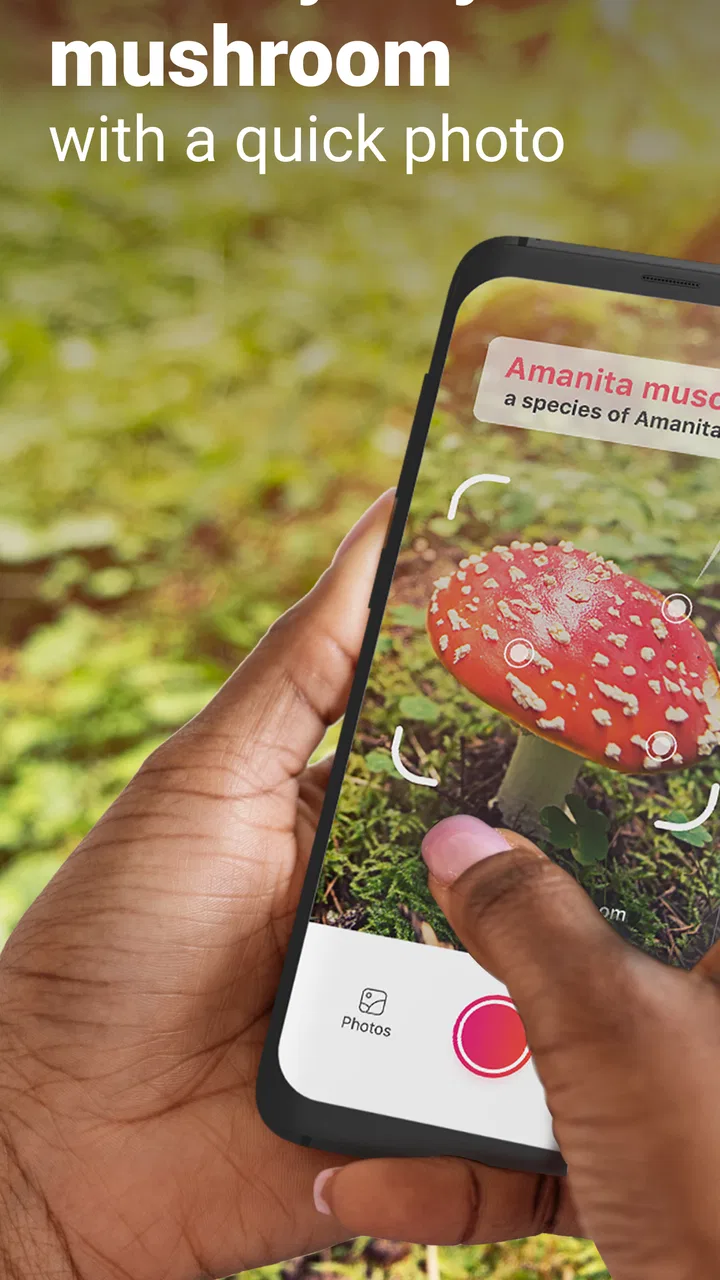
The strongest part of the experience is the camera-first approach. Instead of asking a beginner to recognize gills, caps, stems, or spore prints before doing anything, the app lets the photograph begin the process. That is a meaningful design choice for an education tool. I could start with what I actually had in front of me, then use the result to learn which visual details deserved closer attention.
The basic journey is easy to understand: take or choose a picture, review the identification, and explore the accompanying information. That sequence suits people who are uncomfortable with complicated menus. It also works well for a child exploring nature with an adult, provided the adult treats the result as educational guidance rather than a permission slip to eat a mushroom.
Text-heavy reference apps can be valuable, but they often assume that the reader already knows botanical vocabulary. Picture Mushroom lowers that initial barrier by putting the image at the center. In my experience, this makes it more inviting for casual learners, older users who prefer visual prompts, and anyone who wants to investigate a specimen without first learning a classification system.
The app has reached over a million installs and holds a 4.1 average from around 17 thousand ratings, with about 1.2 thousand written reviews. Those figures suggest a well-established audience, but I would not treat popularity as proof that every identification is dependable. A mushroom guide still has to communicate uncertainty clearly, and the user still needs to inspect the specimen independently.
What helps when vision, attention, or reading confidence varies
A photo-based interface can be more comfortable than a long written key for users who process visual information more easily than technical descriptions. It also gives a learner a concrete object to discuss. Rather than asking, “What is a convex pileus?” I can look at the photograph and compare visible features with the guide.
That said, image-led design is not automatically accessible to everyone. A person with limited vision may find identification from a small photograph difficult, while a user with color-vision differences should be cautious about relying on color alone. Mushroom appearance changes with age, moisture, lighting, damage, and camera processing, so the app is most useful when the photo is supported by observation of texture, habitat, underside, and other details.
I also appreciate that the app can turn a rushed outdoor encounter into a slower learning exercise. I can photograph the mushroom, return to the result later, and compare it with a field guide or an experienced forager. That workflow is less demanding than trying to remember every visual detail while standing on a trail.
For readers who find long pages tiring, the practical approach is to use the app in short sessions. Capture one specimen, read the key points, and save your own notes elsewhere if you need a longer record. The app is better as a focused identification companion than as a complete replacement for a structured botany course.
Motor demands and the realities of taking a good photograph
The biggest physical challenge is not navigating the app; it is producing a useful image. Small mushrooms, uneven ground, low light, and crowded woodland floors can make photography awkward. Someone with hand tremors or limited reach may struggle to hold the phone steady, frame the whole specimen, and capture the cap and stem clearly in one attempt.
I found that a deliberate photo routine makes a noticeable difference. I would first take a wider image showing where the mushroom was growing, then move closer for the cap, and finally photograph the underside if it was safe and practical. Even when the app accepts a single picture, multiple views give me a better basis for checking the result afterward. This is one of the most useful habits to develop because it reduces dependence on one imperfect frame.
Users with limited dexterity may prefer preparing the phone before bending down: open the camera function, adjust the grip, and avoid trying to operate several controls while balancing on a slope. A companion can also take the photograph while the learner handles the observation and reading. That is not a flaw in the app, but it is an important part of using a camera-based tool in the real world.
People who wear gloves in cold or wet conditions may find small on-screen controls less comfortable. In that situation, I would take the photographs with the simplest possible interaction and postpone the detailed reading until I am somewhere stable. The app supports a workflow where observation happens outdoors and interpretation happens later, which is more inclusive than assuming every user can comfortably operate a phone in a forest.
Outdoor use, poor signal, and changing surroundings
Situational access matters here because mushroom hunting rarely happens in a quiet, evenly lit room. Trails can be muddy, phone screens can be hard to read in sunlight, and a user may have only one free hand. I would not depend on the app as my only source of information during a remote walk. Before leaving, I would make sure the phone is charged and carry a conventional guide or another trusted reference, especially if the purpose of the trip is foraging.
Bright sunlight can make photographs look flatter and reduce the visibility of subtle textures. Shade may create the opposite problem, with blur or noise hiding important features. I get better results by avoiding harsh glare, keeping the phone close enough to show the specimen clearly, and taking an extra image rather than repeatedly forcing one difficult shot.
For users who become overwhelmed by unfamiliar outdoor environments, the app can provide a simple activity structure: photograph, identify, read, and move on. Parents or teachers could use that sequence during a supervised nature walk, asking learners to compare the app’s suggestions with what they can see directly. The educational value comes from the discussion, not just from the name appearing on screen.
It is also useful for people who cannot spend long periods outdoors. A gardener, student, or housebound learner could use photographs taken by someone else as study material. That changes the app from a foraging aid into a visual learning resource, although the quality of the experience will depend heavily on the supplied images.
Where the experience still creates barriers
The most important barrier is the risk of false confidence. A visually similar mushroom can be difficult to distinguish even for experienced observers, and a phone-based suggestion cannot replace expert confirmation when consumption is involved. I would never use an identification from this app alone to decide whether a mushroom is safe to eat. That warning is especially important for beginners, children, and anyone who may interpret a confident-looking result as certainty.
Another limitation is that a photograph cannot capture every useful characteristic. Smell, firmness, bruising, spore print color, exact habitat, and changes over time may matter. A camera also encourages users to focus on appearance, even though two similar-looking specimens can have very different practical significance. The app is therefore strongest when it prompts further investigation rather than ending it.
There can be a learning barrier for users who need highly structured explanations. A visual match may answer “what could this be?” without fully teaching “how do I know?” I would like a beginner to compare the result with a printed guide, local expertise, or a mushroom club before building confidence. The app can support that process, but it does not eliminate the need for it.
Cost can become another consideration for people who want only occasional use. The app is free to download, which is helpful for trying the basic experience, but optional purchases may affect users who need more from it. Since the individual items vary in price, I would explore the free experience first and only pay after deciding that the additional material fits my learning habits. That is particularly sensible for families or classrooms working with limited budgets.
The current version is 2.9.31 and works on devices running operating system version 9 or later. That makes the minimum requirement relatively broad for many users, but anyone using an older phone should check compatibility before planning an outing around it. A small screen, an aging camera, or a battery that drains quickly can be more limiting in practice than the software requirement itself.
Who will get the most from it
I would recommend it to curious beginners, hikers who want to learn names, gardeners finding unexpected growth, and teachers looking for a visual prompt during supervised nature activities. It is particularly suitable for someone who finds traditional identification keys intimidating. The image-based entry point gives that person a reason to start learning instead of presenting a wall of terminology.
It can also help experienced users as a quick second opinion. I would use it to generate a possibility, then check the result against regional references and physical features. That is a more responsible role than asking the app to make the final decision. The best users are not the ones who trust it most; they are the ones who know how to question it.
I would skip it if my main goal were guaranteed edible-mushroom verification, advanced taxonomic study, or a complete offline field manual. A specialist book, local expert, or formal course may be better for those needs. I would also hesitate to recommend it as an unsupervised activity for young children, because the visual simplicity could make dangerous overconfidence easier.
My inclusive verdict after using it
Picture Mushroom - Mushroom ID succeeds because it makes the first step feel manageable. The camera turns an unfamiliar specimen into something the user can investigate immediately, and the guide-like presentation gives casual learners a path toward better observation. For people with different reading preferences, limited time, or difficulty using technical identification keys, that is a genuine advantage.
Its accessibility is practical rather than perfect. The app can be easier to understand than a text-only key, but taking good photographs still requires steadiness, suitable lighting, and a safe position. Outdoor conditions introduce their own barriers, and the visual approach cannot replace sensory details or expert judgement. I would plan around those limits instead of pretending they do not exist.
My everyday recommendation would be to photograph several angles, note where the mushroom was found, read the suggested information calmly, and verify anything important with a trusted local source. That workflow gives the app a useful educational role without asking it to do something a phone cannot safely do.
As a free education app for exploring mushrooms and fungi, it is easy to approach and worthwhile for curious learners. The 4.1 average and broad user base make it look reassuring, but my final judgement rests more on how it fits into a careful process. Use it to notice more, learn more, and ask better questions—not as the last word on a mushroom’s identity or safety.
Next Vision Limited has made a tool that is friendlier than many traditional alternatives, especially for people who begin with a photograph rather than specialist knowledge. I would keep it on my phone for identification ideas and nature-study prompts, while carrying a proper reference and following local safety guidance whenever foraging enters the picture.
FAQs for Picture Mushroom - Mushroom ID
01What is Picture Mushroom - Mushroom ID used for?
Picture Mushroom - Mushroom ID is a mobile identification tool that helps you recognize mushrooms by analyzing photos. After taking or uploading a picture, the app compares visible characteristics with its database and provides a likely name, basic information, and related details. It is useful for learning, nature walks, and organizing observations, but results should be treated as guidance rather than absolute identification.
02How accurate is Picture Mushroom when identifying mushrooms?
The app can be helpful when the mushroom is photographed clearly and its important features are visible, but identification accuracy may vary. Similar species, poor lighting, damaged specimens, unusual growth stages, and incomplete images can lead to incorrect suggestions. For this reason, users should compare the result with trusted field guides or expert advice, especially when identification involves possible consumption or poisonous species.
03Can I use Picture Mushroom to decide whether a mushroom is safe to eat?
No. Picture Mushroom should not be used as the sole basis for deciding whether a mushroom is edible. Some toxic species closely resemble safe varieties, and a photo may not show important details such as spore color, texture, habitat, or chemical reactions. Never eat a wild mushroom based only on the app’s result; consult a qualified local mycologist or poison-control resource when safety is involved.
04Does Picture Mushroom require an internet connection or access to my camera?
The app normally needs camera access if you want to photograph mushrooms directly, and it may request access to your photo library for uploading existing images. Internet access can also be required for image analysis, database searches, account features, or updated content. You can review and change these permissions in your Android or iOS privacy settings, although restricting them may limit some functions.
05Is Picture Mushroom free to download, and are there subscriptions or in-app purchases?
Picture Mushroom may be available to download without an upfront charge, but some identification tools, extended information, or other features can be offered through in-app purchases or a subscription. Before confirming a trial or payment, check the current listing in the Google Play Store or Apple App Store for pricing, renewal terms, and cancellation instructions. Availability and plans may differ by country and platform.
Pros
- Identifies many common mushroom species from a single photo
- Provides useful details on habitat
- edibility
- and distinguishing features
- Search history makes it easy to revisit previous mushroom identifications
- Clean interface is simple enough for beginners to navigate
- Can help organize outdoor findings while exploring nature
Cons
- Photo results can be inaccurate with blurry or poorly lit images
- Some advanced identification details require a paid subscription
- Edibility information should never replace guidance from a local expert
- Rare or region-specific mushrooms may be difficult for the app to recognize
- Frequent identification use may require an internet connection

Picture Mushroom - Mushroom ID
Gallery